Quick answer
Hathaura Color Studio if you want a finished, branded 20+ page report from every session. Your Color Style if you also want certification and a directory listing. Draping on its own finds the season, but you still have to write and design every client’s report yourself.
Color analysis software compared
| Option | Software? | Automated client report | Your branding | Price |
|---|---|---|---|---|
| Hathaura | ✓Guided analysis | ✓20+ pages, made for you | ✓Logo & name (Pro) | $49–$149/mo, first report free |
| Your Color Style (Professional) | ✓Analysis tool | ◐Report builder | ?Not stated | $49/mo (+$597 certification) |
| Image Innovators | ◐Digital drapes | ✕None listed | ?Not stated | Members only |
| Draping + building reports by hand | ✕None | ✕You make each one: hours per client | ✓You design it | Drapes from ~$175 |
| Consumer AI apps | ✓Selfie app | ✕For the user only | ✕App’s brand | Free–$15 |
Prices and features of other tools are from their own websites, checked October 2026. They may change; check each provider before buying.
1. Color analysis software
Hathaura
- Best for
- Stylists and analysts who want a finished, branded client report from every session
- Price
- $49 / $99 / $149 a month for 3 / 10 / 20 analyses (from $7.45 per analysis)
- Free start
- First client report free, 30% off the first month
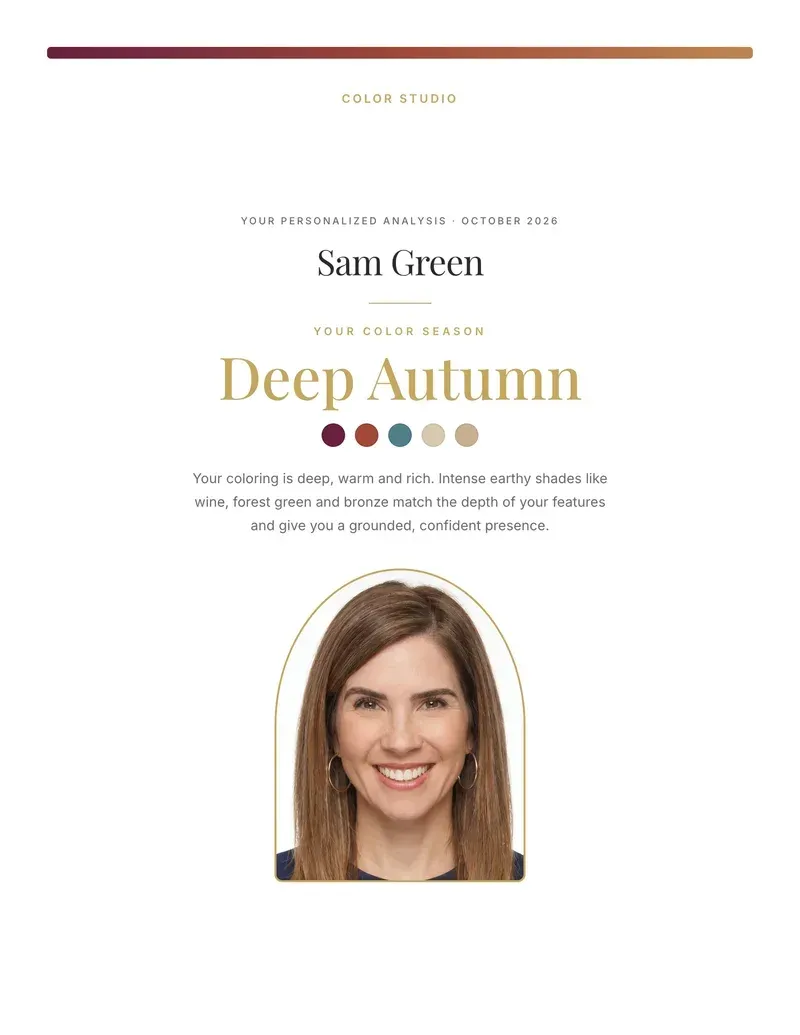
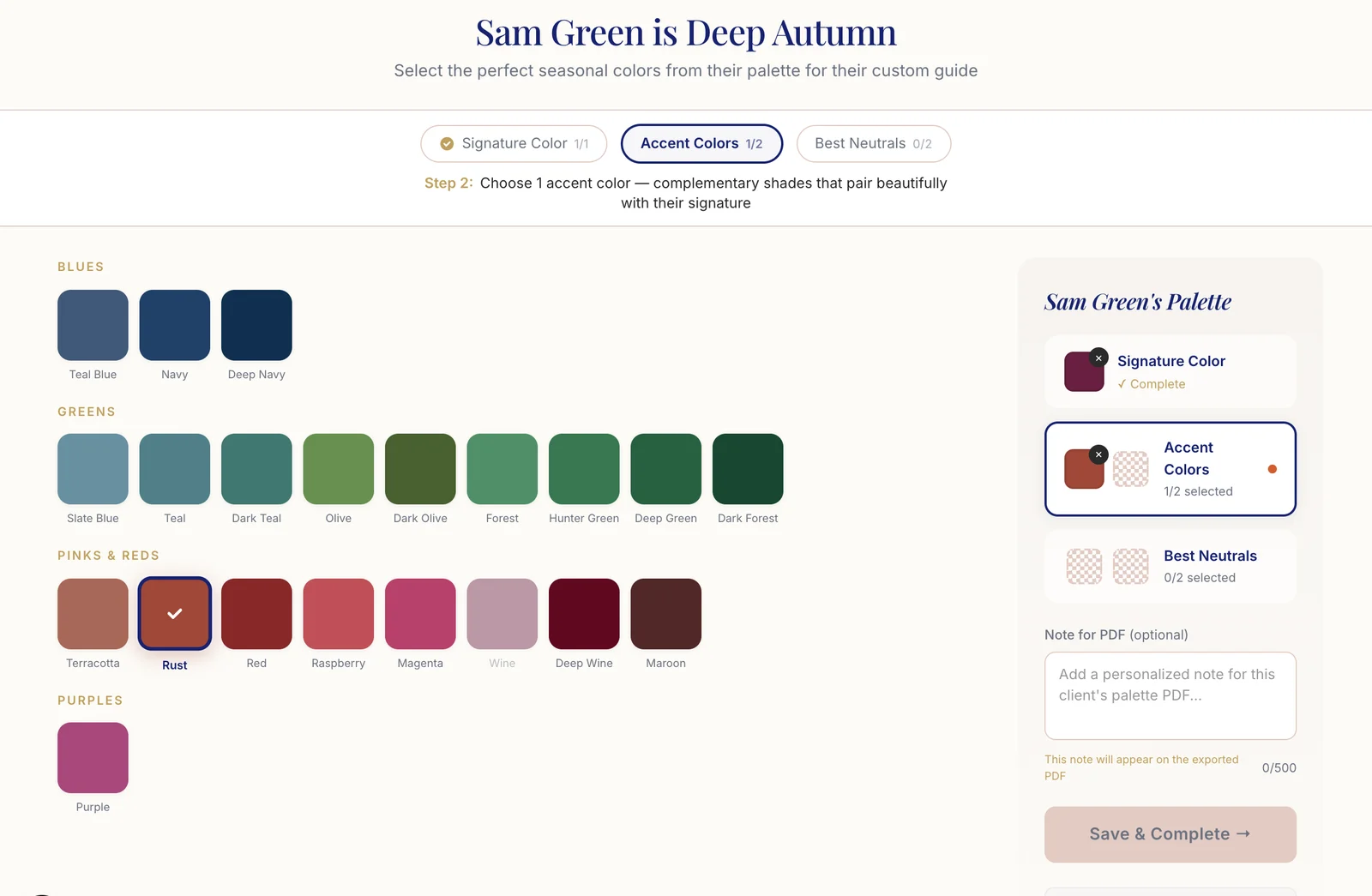
A guided 12-season analysis (the Hathaura Method, developed by Sci\ART-certified analysts): you rate your client’s hair, skin and eyes on hue, value and chroma, Hathaura combines that with color values measured from their photo, and you confirm the season. You then pick their signature color, accents and neutrals, and the client gets a 20+ page report with their palette, colors to avoid, outfits, metals and, for women, makeup. Clients and past analyses are stored in one place.
Strengths
- +Finished 20+ page report from every session
- +Your branding on the report (Pro)
- +Reports for women and men
- +You make the final call on the season
- +Priced per analysis, first report free
Watch out for
- −Monthly subscription
- −Analyses per month are capped by plan
- −Branding is on the Pro plan only
2. Color analysis software + training
Your Color Style (Professional)
- Best for
- Analysts who want training, certification and a directory listing alongside the tool
- Price
- $49 a month; certification $597 for the first year, then $49 a month
- Free start
- Free training available; no free trial stated
A professional membership built around the Your Color Style system of 12 color types. It walks you through depth, undertone and chroma step by step, lets you compare draping and lip colors side by side, stores client photos and saved analyses, and includes a report builder and digital palettes for clients. Eligible members can list themselves in the Your Color Style analyst directory.
Strengths
- +Step-by-step analysis and side-by-side draping
- +Report builder and digital palettes
- +Training library; certification available
- +Directory listing for eligible members
Watch out for
- −Branding options not stated
- −Client palettes are sold separately as credits, per their site
- −Certification is an extra $597 up front
3. Member supplier: physical and digital tools
Image Innovators
- Best for
- Image consultants who want physical drapes, face boards and style guides in one membership
- Price
- Members only; pricing on request
- Free start
- Not stated
A membership for image consultants with physical tools (purpose-dyed fabric drapes, face boards, draping boards, selector sheets) plus digital drapes, digital draping tops, color swatches, a web-based styling tool and 98-page style guides. It is a toolkit for running sessions rather than software that produces a report for each client.
Strengths
- +Physical drapes and boards for in-person sessions
- +Digital draping tools
- +Printed and digital style guides
Watch out for
- −Pricing not published
- −Members only
- −No per-client report builder listed
4. The manual route (no software)
Draping + building reports by hand
- Best for
- In-person analysts with few clients and time to write up each report
- Price
- Fabric drapes from a supplier, from about $175; training from about $697; plus your time on every report
- Free start
- —
Draping is how many analysts find a client’s season in person: fabric drapes from a supplier, natural light and a mirror. But draping only gives you the answer. The client still needs something to take home, so after every session you write up the season, build their palette, choose their neutrals and colors to avoid, and design the report yourself, usually in Canva or a PDF template. That write-up is unpaid time on every client.
After the draping, the report is still on you
- 1Write up their season and why it fits them
- 2Build their palette, neutrals and colors to avoid
- 3Design the report in Canva or a PDF template
- 4Export, check and send it, for every client
With Hathaura, you rate the client and pick their colors, and the 20+ page report is made for you, under your brand on Pro.
Strengths
- +Hands-on draping clients can see
- +No monthly software fee
- +Complete design freedom
Watch out for
- −You still need a way to make the report
- −Hours of write-up and design per client
- −Reports vary from client to client
- −Hard to do virtually
5. Selfie apps (Dressika, ColorMine AI and others)
Consumer AI apps
- Best for
- People finding their own season, not client work
- Price
- Free to about $15
- Free start
- Usually free
Apps that guess a season from a selfie. They are quick and often free, and useful for your clients’ curiosity, but they are built for one person analyzing themselves: there is no client list, no professional review step and nothing to deliver under your name. Results can also change with lighting and camera.
Strengths
- +Free or cheap
- +Instant result
Watch out for
- −Not designed for paying clients
- −No branding or client management
- −Results shift with lighting and filters
How to choose
- Count your clients. Monthly plans pay off once you analyze a few clients a month; at 10 a month, Hathaura’s Stylist plan is $9.90 per analysis.
- Look at the report, not the app. The report is what your client pays for and keeps. Ask for a sample before you subscribe.
- Check who makes the final call. For paid work, you should confirm the season, not an algorithm.
- Decide how much branding you need. If clients should remember your studio, the report needs your logo and name on it.
- Plan for virtual sessions. A tool that works from photos lets you take clients anywhere.
For a full checklist, read how to choose color analysis software, see Hathaura’s plans and cost per analysis, or how to start a color analysis business.
See the report before you decide
Run a real analysis and get your first client report free.
Make your first report free